Essay
Web Browsers in Augmented, Mixed, and Virtual Reality
- 5075 words
- –
Head-mounted virtual reality, augmented reality, and mixed reality devices have received many browsers over the years. Fundamentally, these browsers present a different user experience to browsers on other devices. They’re a very different medium, requiring different considerations and with very different requirements, constraints, considerations, and technologies.
Unlike browsers for other platforms, browsers for virtual reality need to consider a spatial context. Interfaces are not limited to a single surface, or even to multiple surfaces. The interface can wrap around the user, enveloping them, be scaled to a screen the size of the moon, or shrunk down infinitesimally small. The screen can curve or lie flat. A screen can be one of a thousand orbiting a user, and it can be grabbed, resized, and thrown around at will. For as much as a webpage might be viewed in a living room via passthrough, it might be viewed from a lawn chair on the moon. A browser viewport is much more abstract of a concept.
Not to mention, input devices vary greatly. Some devices will have users using controllers, others will have them reaching out with their hands and prodding interfaces. Some folks still will use a mouse and keyboard or a typical game controller. The social aspect of XR experiences also makes it more likely for multiple people to be interfacing with and controlling a single browser instance.
In addition to standard browsing functionality, such browsers also enable experiences unique to the medium. Through WebVR, and later WebXR, virtual reality experiences, such as those that span 180° or 360° around the user, can be created. The user’s device can be detected, as can their input method, and even as much as exactly where they’re looking if the headset is capable of eye tracking.
Especially during earlier years of the medium through the 2010s, web browsers were crucial due to lack of first-party app support. In many cases web browsers were the only way to watch content from streaming services, for example. Having capable web browsers with a diverse number of engines and features without imposed restrictions from the operating system to hinder viability is also key for a thriving ecosystem and an open web.
PCVR
Personal computer virtual reality (PCVR) refers to virtual reality which is powered by an external computer, rather than compute self-contained within the headset. PCVR’s early days were very scrappy. One of the first commercial headsets was the Oculus Rift Development Kit 1 (DK1), which was very little more than a screen and some lenses in a box that could be strapped to one’s face.
Initially, the only browser option available was to use a desktop browser displayed on the headset with no special VR considerations – essentially treating it as a monitor. This changed as browsers began to support WebVR, and then later WebXR, and websites took advantage of the new functionality. Firefox supports WebVR on Microsoft Windows from version 55 onwards, and Edge supported it from versions 15 to 18. Chromium and derivatives support WebXR from version 79, with some taking it further, such as Opera, who were the first to add 360° video support.
Mozilla implemented their WebVR into desktop Firefox as part of a big push into the virtual reality space in 2015 with their MozVR initiative. They began to integrate VR capabilities into Firefox itself and released A-Frame, a web framework for creating WebVR (and later WebXR) experiences.
JanusVR, later revived by the community as JanusXR, is a web browser of sorts. Rather than a browser chrome around webpage content, JanusVR presents web pages spatially, as panes in a 3D world. Websites have 3D spaces associated with them, where users in avatar form can meet and interact with the webpage. Different websites can be travelled between at will via doorway-like portals. Development of the project started in mid-2013.
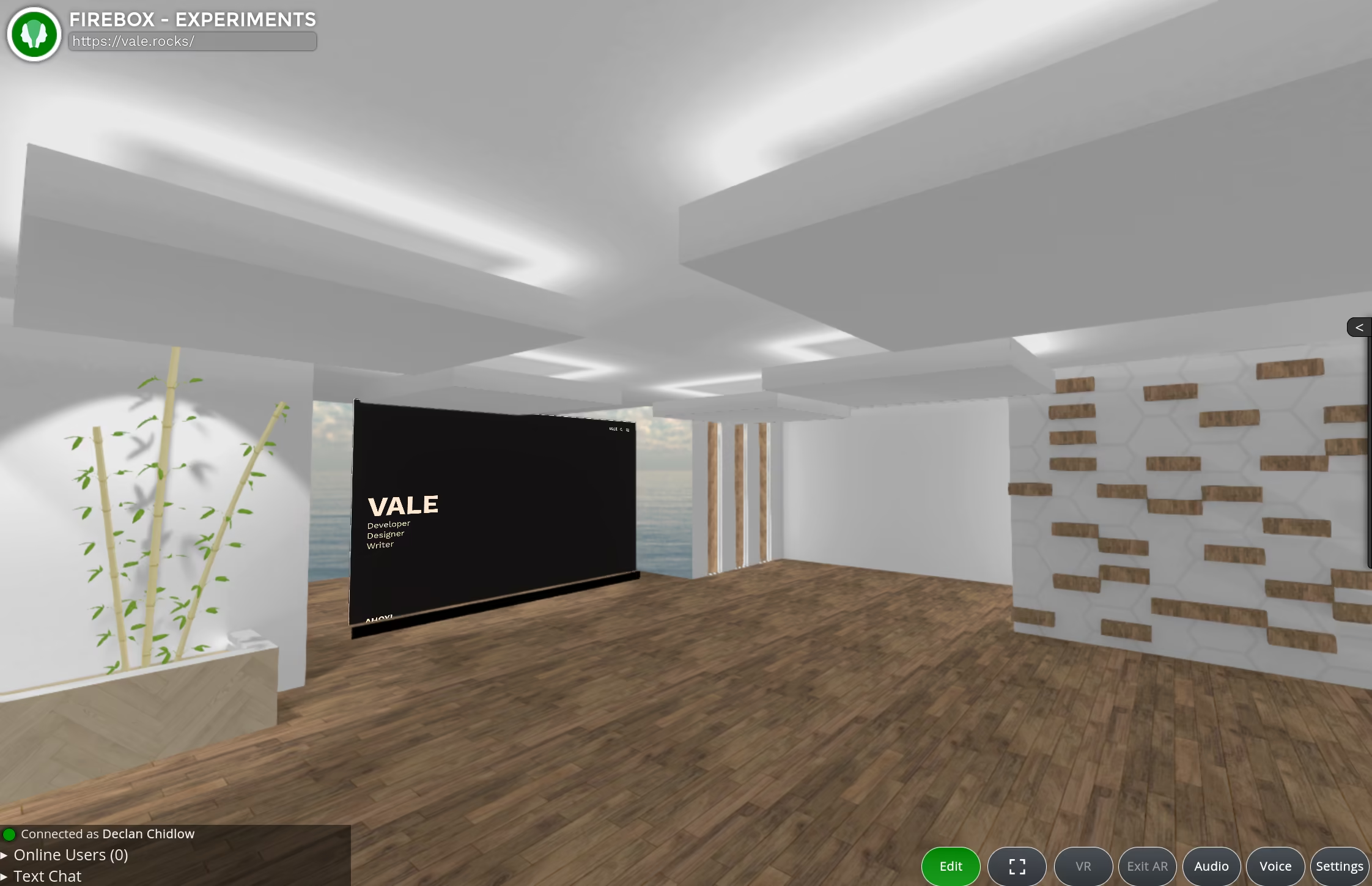
By incorporating the bespoke JanusVR Markup Language (JML) into a website, how this 3D space is presented can be managed. The user interface can be customised, interactive experiences like games can be implemented into the space, and the entire space can be transformed into different rooms with different appearances. Users in the space can place objects and change their appearance as needed. JanusVR is also embeddable, allowing it to be accessed through websites. Janus VR Incorporated dissolved at the conclusion of 2019.
Exokit was a bespoke WebXR engine primarily designed for packaging WebXR experiences as standalone applications and allowing them to expand beyond a browser sandbox into using native libraries and systems. While its engine is bespoke, it does offload 2D pages to Chromium Embedded Framework (CEF). Exokit built a lot of demos and systems atop their engine, and one of these was a browser. Developed in 2019, it was short-lived, and development ceased a few months later. Its unique feature was the ability to merge XR worlds, placing multiple WebXR experiences in the same space which could be manoeuvred around. A separate browser-like front-end for Exokit was also made. Ultimately it seems that the project never quite found its footing beyond a few native ports of WebXR games and that it was discontinued before full browser capabilities became fully realised.1
Though not a dedicated browser per se, MultiVR.se is a room-scale virtual reality environment application launched in 2017 which allows for opening browsers and placing them around 3D space. Multiple browser windows can be open, though the browser is extremely simple with minimal controls – navigation forward/back, an address bar, and a home button.
Supermedium was a virtual reality browser launched in 2018. It was part of venture capital firm Y-Combinator’s Winter 2018 batch. The browser did not have support for viewing standard 2D webpages and was instead entirely centred around WebVR content. The developers of Supermedium took over maintenance of A-Frame from MozVR. In 2020 Supermedium pivoted from creating a VR browser to making a VR comic book reader for the Oculus Quest.
Metachromium released in 2020 and is a Chromium browser overlay designed to provide access to WebXR experiences and work atop other VR software or SteamVR Home. It was abandoned, never leaving early access.
Google Glass
Google Glass was Google’s ill-fated but ambitious attempt to make spectacles with a screen. Prototype devices were first sold in 2012, and the product became generally available in 2013. Google Glass runs Glass OS, also called Google XE, an Android-based operating system built specifically for the smart glasses.
With the XE7 update in 2013, web browsing capabilities were added. The current page can be scrolled with one finger on the trackpad and zoomed with two. By placing two fingers on the trackpad and moving one’s head, the page can be panned around. To click, the touchpad can be tapped to select whatever is in the centre of the screen. The browser is limited and ephemeral, being designed to view information at a quick glance and not being intended for general browsing. It displays the mobile versions of pages and lacks tab management, complex settings, cookies, etc. It is even devoid of any browser chrome.
Despite the limitations, the browser has full support for then-modern web standards. Version XE9 added syncing of searches with Google account search history, and XE10 allowed opening links directly from notifications.
Cardboard
In 2014 Google began experimenting with phone-based virtual reality via Google Cardboard – named as such due to the headset quite literally being a folded bit of cardboard. With some lenses and a smartphone set inside the cardboard headset, it exposed a very basic VR system.
Google Cardboard is handled on an app-by-app basis, rather than being an operating system with provided functionality, so there is no inbuilt browser. There are, however, a range of browsers designed for use with the Cardboard. Chrome and many other Chromium-based browsers have WebVR/WebXR support which can work on the Cardboard, though lack general browsing capabilities. For general browsing, Fulldive VR and Vuplex VR Web Browser were relatively popular among the more enthusiast crowd, albeit limited. The Cardboard is simply not equipped for a comprehensive browser experience due to the low resolution and poor input method, though some people mirrored their computer display to the headset in pursuit of something more capable.
Alongside the Cardboard, Google promoted VR View for the Web, a library to facilitate embedding 360° photos and videos into websites.
Gear VR
The Gear VR is a headset from Samsung, which, like Google’s Cardboard, requires a flagship Samsung phone to be inserted. Unlike the Cardboard, however, it has a controller allowing for much more precise and capable input.
Gear VR released in 2015, and the same year Samsung launched a browser for their Gear VR system aptly titled ‘Samsung Internet for Gear VR’. The browser is built on Chromium and supports multiple windows (only one can be active at a time), tabs, bookmarks, voice input, and settings for the search engine and control over gaze selection. Version 4.2 at the end of 2016 introduced the ability to select a 360° image for menus, support for v1.0 of WebVR, and a feature called Skybox, which allows websites to set their own 360° image.
A developer preview under the codename ‘Carmel’ was made available for the Gear VR in 2016, primarily as a test of 3D WebVR content. It was based on Chromium, and being an early development test, it lacked any proper interface other than some buttons to visit demos. Developers were advised to use Chrome Remote Debugging for Android as part of their experimenting. Carmel later graduated into the full Oculus Browser on the Gear VR.
As part of the XR push Mozilla made with MozVR, they launched Firefox Reality for standalone Android-based VR headsets in September 2018. Built upon the Gecko engine, in contrast to other browsers available for standalone VR at the time, Firefox Reality started off simple and quickly started packing on features.
Firefox Reality is not a simple port of Firefox for Android or desktop and instead has a completely tailored interface with large, easy-to-access buttons and elements laid out in 3D space. The browser features voice input, private searches, resizing the window, navigation, choosing a 360° environment, viewing browsing history, downloading content, installing extensions, switching between mobile/desktop versions of sites, and other browser staples. In addition to browsing related buttons, the UI displays stats, such as Wi-Fi connection strength and battery levels, and the browser also had full integration with Firefox syncing, allowing sending tabs to and from the headset, as well as syncing bookmarks.
Vuplex VR Browser released in 2019 for the Gear VR. It uses the Android System WebView and supports multiple, arrangeable open windows and tabs within those windows, so the user can have multiple pages open simultaneously. Expected navigation features are present, as is history management. The skybox can be customised, but bookmarks and tab rearranging aren’t present. The browser was likely released as marketing for Vulplex’s 3D WebView.
Daydream
Much like Samsung’s Gear VR and expanding on what they started with the Cardboard, Google released the phone-based Daydream platform in 2016, built into Android. In November, the first Daydream headset, the first-generation Daydream View, released. Unlike the Cardboard, Daydream has first-class controller support.
Being a Google platform, Chrome launched for the Daydream in July 2018. Despite how it was marketed, Chrome on Daydream is not a separate browser but is instead Chrome for Android. It supported WebVR, and, later, WebXR. In addition to being launchable directly from the Daydream’s home screen, sites can be opened directly by navigating to them on Chrome on the phone and then placing the phone in a Daydream headset. Support for Daydream was removed from Chrome with Chrome 85.
Daydream received Firefox Reality when the browser launched in 2018 and Vuplex VR Web Browser in 2019. Both browsers stopped receiving updates when the Daydream platform was discontinued in October 2019.
Oculus Go
The Oculus Go was Oculus’ first standalone virtual reality headset and released in 2018. It is roughly a self-contained version of the Gear VR, having all the compute integrated and no phone required.
The Go has an inbuilt browser. It is the Chromium-based Oculus Browser. It has support for tabs, private mode, bookmarks, and allows downloads. It has a limited selection of settings, such as to change the default search engine. The width of the browser window can be configured, the page can be zoomed, and it is possible to switch between desktop and mobile versions of sites. The browser only received minor updates, bumping the Chromium version and tweaking performance.
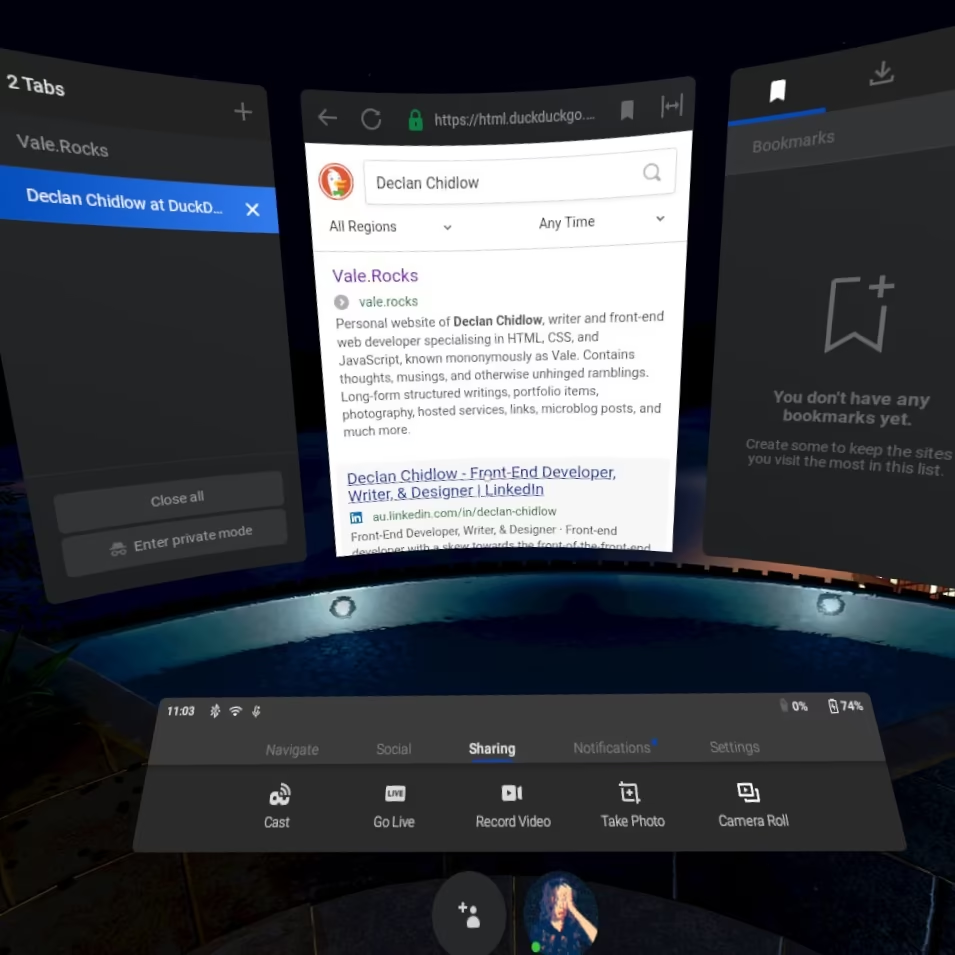
Being so similar, the Oculus Go maintained backwards compatibility with the bulk of Gear VR applications. As such, in mid-2018 Samsung Internet released for the Go, being a port of the Gear VR version and having the same functionality.
Firefox Reality was immediately available for the Go, alongside the Quest and Viveport versions, when the browser launched in 2018. Vuplex VR Browser was also made available, being the same as the Gear VR version. No further browser releases or updates were published to the Oculus Store after December 4th, 2020, due to Oculus disallowing new submissions or updates for Oculus Go applications.
Vive Focus
The Vive Focus line of headsets are standalone Android-based devices.
The devices originally had Firefox Reality, however, Mozilla stopped supporting it in 2022. Open-source consulting firm Igalia approached Mozilla, picked up the project, and continued it as Wolvic. A direct continuation of Firefox Reality, Wolvic maintains all the same features and functionality with improvements atop.
Wolvic doesn’t have a direct release for the Vive Focus, but Vive does distribute an extremely lightly modified version of Wolvic as VIVE Browser.
Magic Leap
Magic Leap are a series of augmented and mixed reality headsets by Magic Leap Incorporated which target the enterprise space. On account of being an enterprise product, Magic Leap are rare to disclose details about their device and systems, making public documentation of their browsers rather limited.
The company’s first headset, Magic Leap 1, released in 2018 and runs Lumin OS, a proprietary system built upon Linux/Android. The OS includes Magic Leap’s own Chromium-based Helio browser. Version 0.94 largely improved browser controls and input. 0.96 changed the browser to render based on physical pixels, rather than downsampling. 0.97 in 2019 introduced dark mode support and the ability to create bookmarks that exist spatially. On websites with a white background, the dark mode disables the background, leaving the page content floating in augmented reality. Lumin OS 0.98.10 added the ability to lay web pages flat on horizontal surfaces, such as tables, and improved streaming support. Version 0.98.20 added support for WebRTC for better compatibility with video conferencing software. The Magic Leap 1, along with its browser, reached end of life in December 2024.
The Magic Leap 2 released in 2022 and runs a greatly modified version of Lumin OS. Titled Magic Leap OS, it is based entirely on Android. An inbuilt browser titled ‘Web Browser’ was added with OS version 1.1.0. It is Chromium-based and completely new, not built upon Helio and lacking many of its features. It supports navigating forward and back, cookies, WebXR, JavaScript, rendering at a resolution of 1065x616 px, downloading and installing applications, and scanning QR codes through the device’s inbuilt browser. It doesn’t support multiple windows, tabs, or bookmarks.
Before the browser released, a pre-release version of the operating system (B3E.220721.07-R.026) added a separate WebXR Viewer application for developers to test compatibility, though it lacked any general browser functionality. Version 1.2.0-dev1 added controller-less interactions with the browser. Version 1.2.0 added support for creating APKs which open websites in their own browser session, à la PWAs. Version 1.3.0-dev1 (full release 1.3.1) introduced a downloads page to the browser.
The Magic Leap 2 supports Wolvic, and it can be configured as the default browser. It supports OpenXR eye tracking.
Windows Mixed Reality
Windows Mixed Reality was a virtual and augmented reality platform from Microsoft that runs upon Windows. The first headset released was the Microsoft HoloLens in 2016.
Being a Microsoft venture, Microsoft Edge was available for the device. Initially the EdgeHTML version which has been retroactively dubbed ‘Microsoft Edge Legacy’. It has a simplified interface from the desktop version, sporting bigger buttons for easier selection, though contains the same tabs, bookmarks, downloads, history, reading view, and other features expected from Edge Legacy. Atop the browser window are three tools: scroll, drag, and zoom, to allow easy navigation without fiddling. It supports WebVR.
The updated Chromium-based version of Edge later replaced the legacy version with the Windows Holographic 21H1 update. This switch replaced the WebVR support with Chromium’s WebXR support and added spatial sound from single browser windows. Instead of a modified interface tailored for limited XR input dexterity, this updated version is Microsoft Edge’s desktop interface almost exactly as-is. A cool effect the browser incorporates is three-dimensional raising of some browser interface elements when they’re open.
Being essentially standalone PCVR, other browsers available on Windows could also be used and accessed.
Oculus/Meta Quest
Oculus released the first Quest in 2019 as a successor to the Oculus Go, and is again fully standalone. In a departure from the Go, however, headsets in the Quest line have six degrees of freedom, are much more powerful, and support more input methods, such as multiple controllers and hand tracking.
The Quest’s operating system, HorizonOS, previously known as Meta Quest OS, is based on the operating system previously used on the Oculus Go. As such, it carries over the same Chromium-based browser, here called the Meta Quest Browser (previously the Oculus Quest Browser).
The interface of the web browser on the Quest was near-identical to the web browser on the Oculus Go at launch, with a few minor cosmetic changes and the same three-panel design: one for tabs, one for the browser viewport, and one for bookmarks/downloads/settings. The first interface overhaul came in June 2019. In November support for 60 FPS display was added alongside page zoom control, and a month later WebXR support was enabled, having been added experimentally in November 2018.
The first major overhaul came in March 2020 with the launch of the Quest 2. The browser lost its three-panel design, instead being one display with the previous functionality of the left and right panels being moved into buttons next to the address bar and other browser interface elements, more akin to a typical desktop browser. This update also started requesting the desktop versions of sites by default, rather than the mobile versions.
WebVR support was dropped in April 2020, and in September 2021, Google Safe Browsing filtering was added. In March 2024 support for multiple browser windows and browser extensions was implemented, and in April 2024 tabs were made rearrangeable by dragging. May 2024 brought push notification support, in August the browser began collapsing the tab bar if only one tab was open, and in September support for Dolby Atmos, Spatial Audio, and Logitech MX Ink was added. In January 2025 it was made so that a PDF reader is automatically installed, passwords can be imported, and site permissions can be more easily managed.
Most updates following the 2020 overhaul were minor from a visual perspective, mainly tweaking the interface to adhere to general operating system design changes. This changed in 2025, where the new Navigator user interface began to roll out. Fully rolling out in April 2026, Navigator is an attempt to embrace spatial computing and modifies the OS and browser to facilitate it, putting a much greater focus on augmented reality usage and multitasking with multiple windows.
In June 2025 support for using the Avatar Selfie Camera was added, and the following month the main menu user interface was tweaked. In May 2026 the ability to anchor browser windows to walls on the Quest 3 and later was introduced. It receives very active development with constant performance improvements, bug fixes, and bumps to the underlying Chromium version.
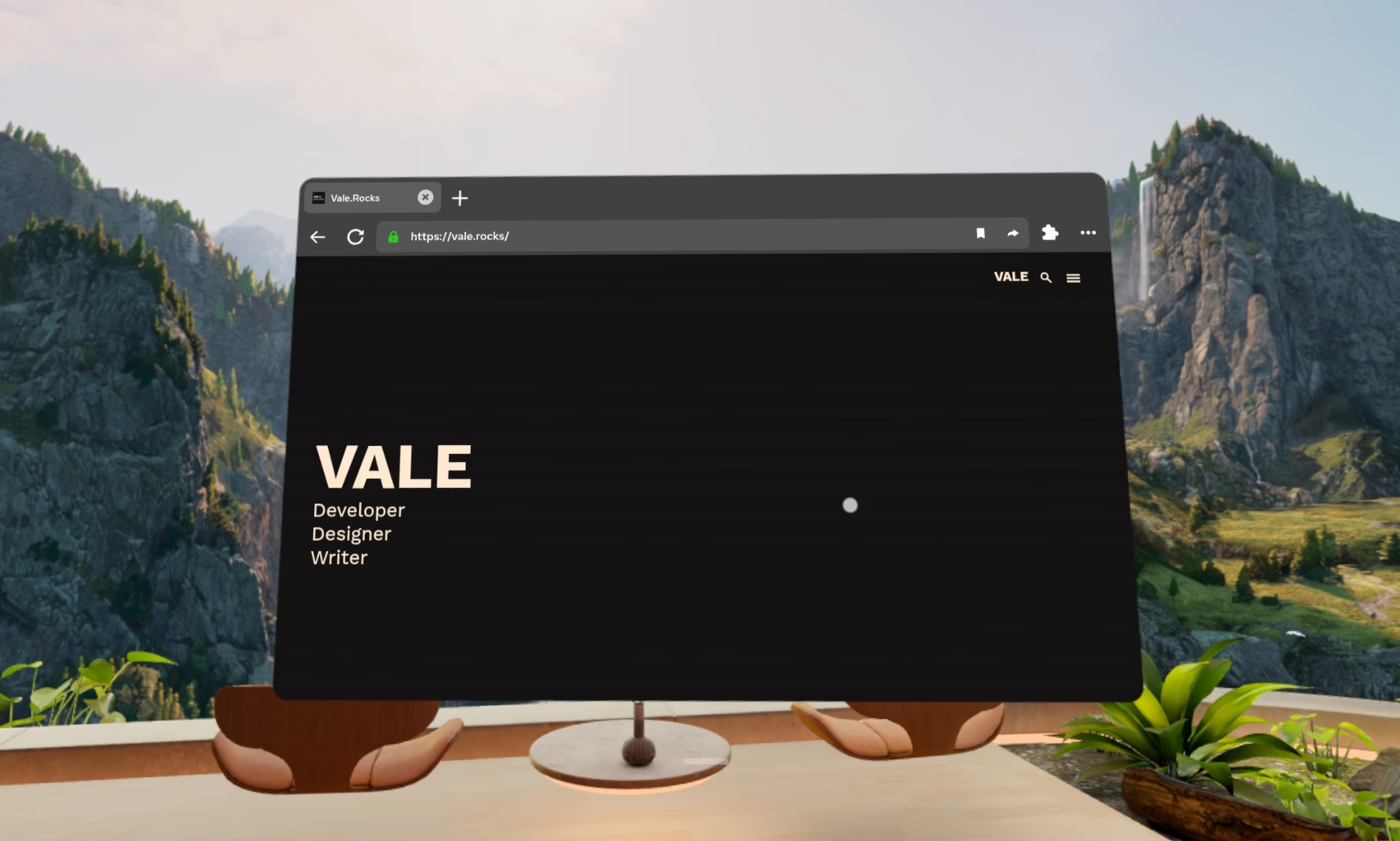
Originally Firefox Reality was available for Quest headsets, but when it was discontinued, Wolvic became available to download. It functions the same as on other headsets, and, on the Quest Pro, supports OpenXR eye tracking as of version 1.7.1.
Igalia has modified the browser to be engine agnostic, allowing them to introduce support for a Chromium-based version in addition to Gecko. The reason for this decision was Mozilla’s deprioritisation of focus on XR improvements and many other XR browsers building upon Chromium and thus providing upstream support. The first full release of the Chromium-based version of Wolvic came in September 2024. However, the Gecko version is the version available in platform stores. In November 2025, Igalia announced that, due to the changing XR landscape, Wolvic would be moving into maintenance mode. Despite this, minor feature updates have continued.2
Released in 2022, Reality Browser is an extremely simple browser that allows pages to be placed in 3D space. Multiple windows can be opened, arranged, and resized, and it supports navigating forward/back, refreshing the page, typing in the address bar, and bookmarking sites.
VoiceSurfer is a simple German browser released in 2023 by NAU-HAU designed for use by people with accessibility considerations limiting movement and dexterity. It has large buttons and can be controlled entirely by voice, hence the name. A slightly different version was previously released under the name ‘Mimik Browser’.
The pseudo-operating-system application Fluid released in 2023 and provides a spatial environment in which browser windows can be placed. Multiple windows can be accessed at once and can be pinned to follow you around. Websites can be added to the environment’s app drawer for easy access, pages can be zoomed, made full screen, and you can switch between desktop and mobile versions of sites. The browser also supports multiple browser engines – namely Blink and Gecko – including on a per-tab basis. When using Gecko, extensions can be installed.
Oasis Browser is a very simple spatial Chromium-based browser that was also released in 2023. It allows customising a space by setting the skybox and placing furniture. In this space one can then create and arrange browser windows, each of which can be resized and support multiple tabs, zooming, bookmarks, and navigation.
Another 2023 release is Spaceframe, which is a spatial notebook of sorts. Browser windows, images, and text can be placed in 3D space and connections drawn between them. The browser functionality is intensionally simple and allows bookmarks. Links open in new windows, as part of the spatial arrangement. The canvas, which is what Spaceframe calls the environment in which its content exists, can be zoomed into and out from, as well as moved around, with the content dynamically changing its display for best presentation at whatever size.
The Quest 1 was discontinued in 2020 and received its last feature update with version 50 in February 2023. The ability for developers to update apps on the Meta Store ended in May 2025, meaning any more recent browsers or browser versions must be sideloaded.
Pico
Very early Pico headsets, such as the Pico Goblin, had an inbuilt browser, though it lacked any support for WebVR or WebXR and was just a flat mobile browser interface.
General details of Pico’s own web browser are extremely poorly documented, with very little information existing in English or Chinese. The browser is Chromium-based and since at least 2024 allows tabs, bookmarks, downloads, setting the search engine, switching between the mobile and desktop versions of sites, searching in-page, incognito windows, WebXR, viewing browsing history, and zooming. The browser can also add shortcuts, which appear in the system dock. System version 5.11.0 in September 2024 added the browser application itself to the system dock, and 5.12.0 in November 2024 added support for multiple browser windows.
Pico OS 6 introduced support for progressive web apps (PWAs) and even allows them in the Pico app store. Web apps are very well supported and are extremely well documented on the platform for developers to take advantage of.
Firefox Reality was supported on a range of Pico devices before its discontinuation in 2022. Wolvic picked up support, though, supporting the existing devices, and adding support for the Pico 4 and Pico 4E in Wolvic 1.3. The Pico 4 Ultra gained support with Wolvic version 1.7.1, and the same version added OpenXR eye tracking support for the Pico 4E.
Huawei
Huawei released two sets of smart glasses. In 2019 they released the three degrees of freedom Huawei VR Glass and followed it up in late 2020 with a six degrees of freedom variant, and in 2022 they released a successor called the Huawei Vision Glass.
The glasses have no on-board compute, instead requiring tethering to another device. They’re primarily intended for use with devices running Harmony OS (鸿蒙操作系统), which is roughly a Chinese equivalent of Android.
Wolvic is available on the Huawei App Gallery both inside and outside of mainland China for use with the glasses.
Lynx-R
The Lynx R1 was released by French company Lynx-R in 2022. It is aimed at a professional market, primarily enterprise. The device does not have a bespoke browser, instead bundling Wolvic with its firmware.
Apple Vision Pro
Apple released their Vision Pro headset in 2024 with an operating system built upon iPadOS. Input is primarily achieved via hand tracking and gestures. For the device, they released a port of Safari with extended reality-specific considerations, such as a new interface which would later become the basis for the Liquid Glass redesign of Safari on Apple’s other devices. It has feature parity with Safari on Apple’s other platforms, including tabs, extensions, iCloud syncing, and so forth.
The browser has a feature titled ‘spatial browsing’, which is akin to a reader mode. It reformats the page for simpler reading and displays spatial media which can be viewed with parallax, like looking in through a window. The parallax effect is even evident when scrolling along a page. In some cases static images are also transformed into spatial scenes.
visionOS 2 enabled WebXR support by default. With visionOS 26, Apple introduced the HTML <model> element, allowing the easy embedding of 3D models onto webpages. The models can be animated. With visionOS 27 Immersive Backdrops were implemented, providing an API to allow developers to present full 3D environments around users. visionOS 27 also made it possible to curve Safari’s window.
Various other browsers are available, though visionOS has the same Apple-imposed browser restriction as iOS, where WebKit is the only engine available. The difference between browsers is their interface. Lens shows websites as they appear on other devices, without optimising for a spatial context.
Android XR
Samsung’s Galaxy XR headset launched in 2025 as the first Android XR device. Android XR being a version of Google’s Android operating system built for virtual and augmented reality usage. Unlike Samsung’s previous headset, the Gear VR, the Galaxy XR is fully standalone and does not require a phone to be inserted.
Android XR is completely compatible with existing Android apps, allowing it to run a wide variety of browsers already available for phones and tablets as screens in virtual space. Google Chrome functions exactly as it does on mobile, though has full support for WebXR.
Footnotes
-
Exokit’s history is rather opaque and poorly archived on account of Exokit using Exokit and WebXR to market and document Exokit. As such, archival efforts such as the Internet Archive were unable to preserve copies of the very dynamic pages.
Exokit itself was compatible with a range of headsets, including Oculus’ standalone devices, Google Daydream and Cardboard, Magic Leap, HoloLens, and PCVR, though it is unclear if the browser had specific versions for this platform. ↩
-
My great thanks to Brian Kardell, who has worked on the Wolvic project at Igalia, for taking the time to answer some of my questions. ↩